
Connect LINE to GoHighLevel: Zapier, Make and n8n, reviewed honestly
There are four ways to get LINE messages into GoHighLevel, and three of them are glue. This guide walks each route as it actually works in 2026, including the parts the tutorials skip.
9 min read
If you run an agency or a business in Japan, Taiwan or Thailand, the problem is familiar. Your customers message you on LINE. Your CRM is GoHighLevel. The two have never spoken natively, and GoHighLevel has no built-in LINE channel.
We build one of the four options below, so we hold a stake in the conclusion. Every limitation described here is still checkable: each one comes from public documentation, community threads, or LINE's own API rules, and the source sits next to the claim.
Start with the short version, then take whichever route matters to you.
The short version
| Route | What you get | Where it breaks | Cost shape |
|---|---|---|---|
| Manual copy-paste | Full control, zero setup | Every message handled twice; nothing automates | Staff time |
| Zapier | LINE events create or update GoHighLevel contacts | No conversation in the unified inbox | Per task |
| Make.com | Official templates watch a LINE webhook and update records | Same inbox problem; operations metered per step | Per operation |
| n8n / raw Messaging API | Real two-way automation, if you build and maintain it | Reply tokens expire fast; pushes need a paid LINE plan | Engineering + LINE plan |
| Native app (this one) | Two-way LINE thread in the unified inbox, workflow triggers included | Needs the two LINE console values; LINE plan limits still apply | Flat per account |
The next three sections take the glue routes one at a time. After that: when the glue is enough, and what a native conversation provider changes.
Route 1: Zapier
Zapier can move LINE events into GoHighLevel. The GoHighLevel side connects through the LeadConnector app, and a zap can watch for a new message or friend addition, then create or update the contact, apply tags, or fire a notification.
What no zap can do is create a conversation in the unified inbox. Zapier moves data between records; it has no way to open a thread your team can read and continue where they work. The practical result is one-way plumbing: facts about LINE activity arrive in GoHighLevel, while the conversation itself still lives in the LINE app.
- The LeadConnector Zapier app covers a fixed action catalog; users routinely ask for custom actions on Zapier's community forum when theirs is missing
- Billing is per task, so a busy Official Account converts directly into a larger Zapier bill
- Expired connections and auth failures fail silently unless someone watches the task history
“Receive and reply to LINE messages directly inside GoHighLevel (and use Conversation AI)”
Sources: zapier.com/apps/leadconnector/integrations · Zapier community forum threads requesting LeadConnector custom actions
Route 2: Make.com
Make.com runs an official GoHighLevel integration page with ready-made templates, LINE included. A typical scenario watches a LINE webhook, filters the event type, and calls GoHighLevel to create or update the contact. For notification-level needs, this works.
The inbox wall is identical to Zapier's. A scenario updates records; it cannot hold a conversation. Replies still happen in the LINE app, the thread still never appears in Conversations, and your team still works in two places.
- Operations are metered per module run. A message that touches four modules costs four operations — per message, every day
- When LINE or GoHighLevel changes a field shape, unmapped values drop without an error. Teams usually discover this when a lead arrives missing a phone number
- Debugging happens in Make's execution log, which presumes someone owns the scenario
Source: make.com/en/integrations/highlevel (official templates page)
Route 3: n8n and the raw LINE Messaging API
This is the engineer's route, and it is the only glue route that can technically deliver true two-way messaging. Before you build on it, understand the physics that make it fragile.
Every inbound LINE message carries a reply token. LINE issues one token per message, it works exactly once, and it expires fast. LINE's documentation describes the validity period as short, and builders lose it in practice to anything that takes more than a few dozen seconds. An n8n builder hit exactly this in the community forum: a workflow that waited on a reply node came back to an invalid token. Any AI summary, CRM lookup or queue delay between message and reply risks the same failure.
The standard workaround is to skip the reply token and send a push message instead. That solves the timeout and walks you into LINE's pricing: push messages count against the Official Account's monthly allowance, while Reply API sends do not. LINE's free Communication plan includes 200 messages a month with no way to buy more; the Light plan (¥5,000/month) includes 5,000; the Standard plan (¥15,000/month) includes 30,000 and meters beyond that at about ¥3 per message. An architecture that forces every reply through the push API converts conversation volume directly into LINE plan costs.
- Reply tokens: single-use, short-lived. Automated replies must be near-instant or they fail
- Push messages, the workaround, consume the LINE plan allowance; Reply API sends don't
- Self-maintained: webhook signature verification, long-lived token rotation, retries, and per-client channel isolation if you serve multiple accounts
For a team with an engineer who already runs n8n and wants full control, this route is legitimately the right answer. For everyone else it is an ongoing project with a monthly meter attached, which is a different thing from a setup.
Sources: n8n community forum, invalid-token report after a webhook wait · LINE Official Account plan page, lycbiz.com/jp/service/line-official-account/plan
When the glue is enough
We sell the native route, and we will still tell you plainly: there are situations where Zapier or Make is the better buy.
- You only need notifications. A new LINE message pinged to Slack or email is a few dollars a month of glue
- Nobody on the team needs to read or continue the LINE thread inside GoHighLevel today. If replies stay in the LINE app by choice, the inbox is not a requirement
- You need a one-off data job, like importing LINE-sourced contacts, rather than a live conversation channel
Buy the native app when the conversation itself — the thread, the shared reply, the history on the contact — needs to live in the CRM. That is the specific job glue tools cannot do.
What a native conversation provider changes
GoHighLevel treats certain integrations as conversation providers: first-class channels, the way it treats SMS, WhatsApp and Messenger. A conversation provider puts its messages inside the unified Conversations inbox, keeps the thread on the contact record, and sends replies back out through the same channel. LINE becomes a channel of the CRM instead of data shuttled between two systems.
That mechanism is what this app uses. Install it from the marketplace, paste the two values from your LINE Developers console — the channel token and channel secret — and the webhook URL registers itself. About ten minutes, end to end.
One honest note about setup: no LINE integration can skip the LINE Developers console, ours included. The two console values are LINE's own security requirement. Messages LINE generates itself — greeting messages, automatic responses, broadcasts sent from the Official Account Manager — belong to LINE and never appear in the CRM conversation.
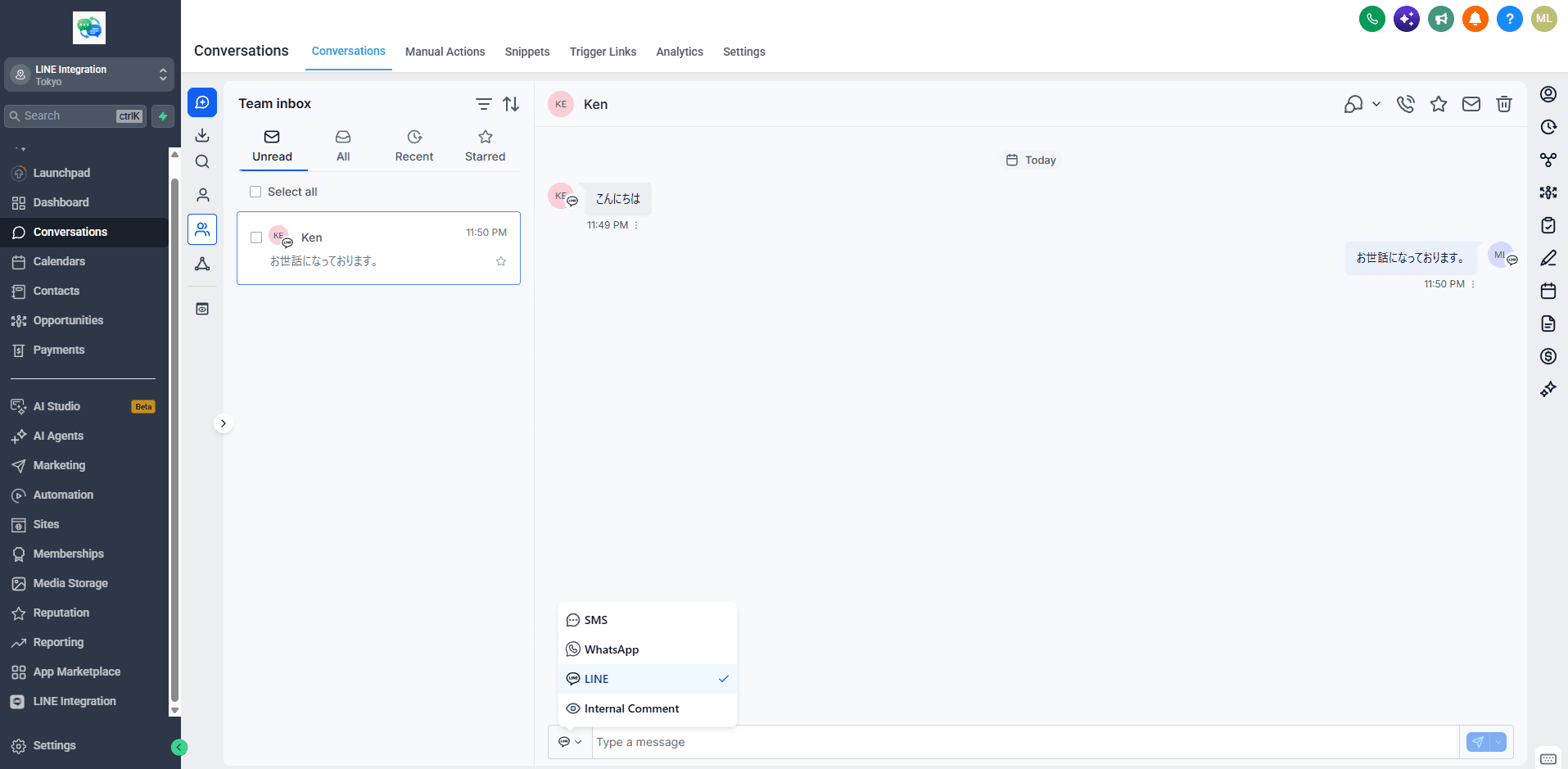
- Inbound LINE messages land in Conversations labeled as the LINE channel — the compose picker lists LINE alongside SMS and WhatsApp
- Your team replies from the conversation view; the full thread stays on the contact record
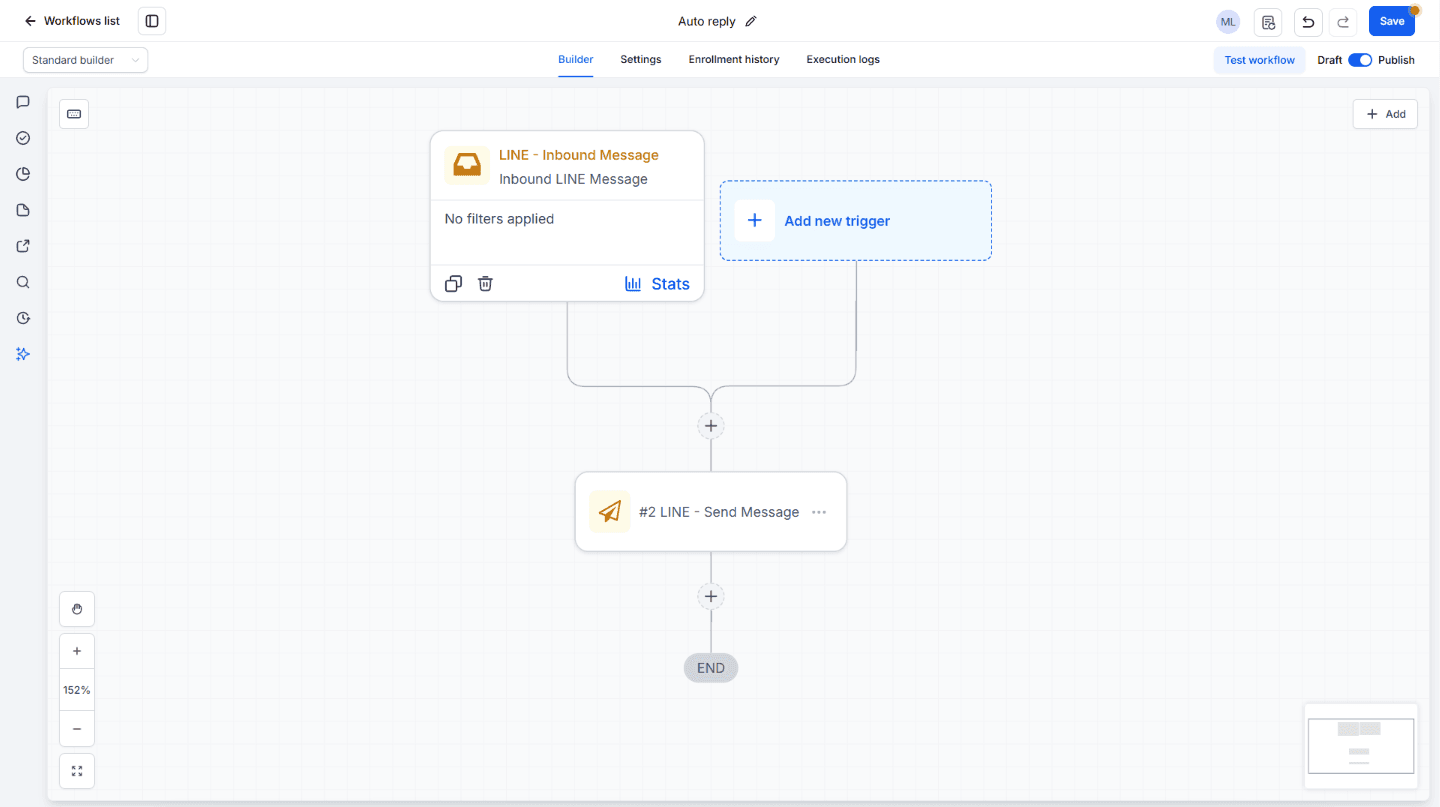
- Workflow triggers: message received, friend added. Send LINE messages from any workflow
- Contacts are created automatically with the LINE display name and LINE ID
- Images and attachments flow both directions
Pricing is flat: $29.9 per account per month, or $299 a year, with a 14-day free trial. Per-message metering is LINE's business model, not ours. LINE's own plan costs apply on every route described above, including this one.
Frequently asked questions
- Can Zapier connect LINE to GoHighLevel?
- It can move LINE events into GoHighLevel contact records through the LeadConnector app. It cannot create the conversation itself: no zap can put a LINE thread in the unified Conversations inbox or reply to the customer from there.
- Why does my LINE reply fail with 'invalid token' in n8n or Make?
- The reply token LINE issues with each inbound message is single-use and expires quickly. If your workflow takes longer than a few dozen seconds to respond — an AI step, a lookup, a wait node — the token is already invalid. The fallback is a push message, which works but consumes your LINE plan's monthly allowance.
- Does the native app also need the LINE console values?
- Yes — the channel token and channel secret from the LINE Developers console. That step is LINE's security requirement and no integration can remove it. What the app removes is the manual webhook configuration: the URL registers itself when you save.
- How many messages does LINE's free plan include?
- The free Communication plan includes 200 messages a month. Beyond that, upgrade: Light is ¥5,000 a month for 5,000 messages, Standard is ¥15,000 a month for 30,000 plus pay-per-message beyond that. Push and broadcast messages count against the allowance; Reply API sends do not.
- Does it work on white-label (rebranded) GoHighLevel platforms?
- Yes. The app installs from a rebranded platform's own marketplace, supports bulk install across client accounts, and shows end users no vendor branding.