
How it works
Install → connect → talk. About 10 minutes, no engineering required.
- 1
1. Install the app
From the marketplace, install Jimoto Digital - LINE Integration to your account. Billing is native to the marketplace and your 14-day free trial starts immediately.
- 2
2. Connect your LINE Official Account
In the LINE Developers console, open your Messaging API channel and copy two values: the channel token and the channel secret. Paste them into the app's connection screen. The webhook URL is registered automatically — there is no manual endpoint configuration.
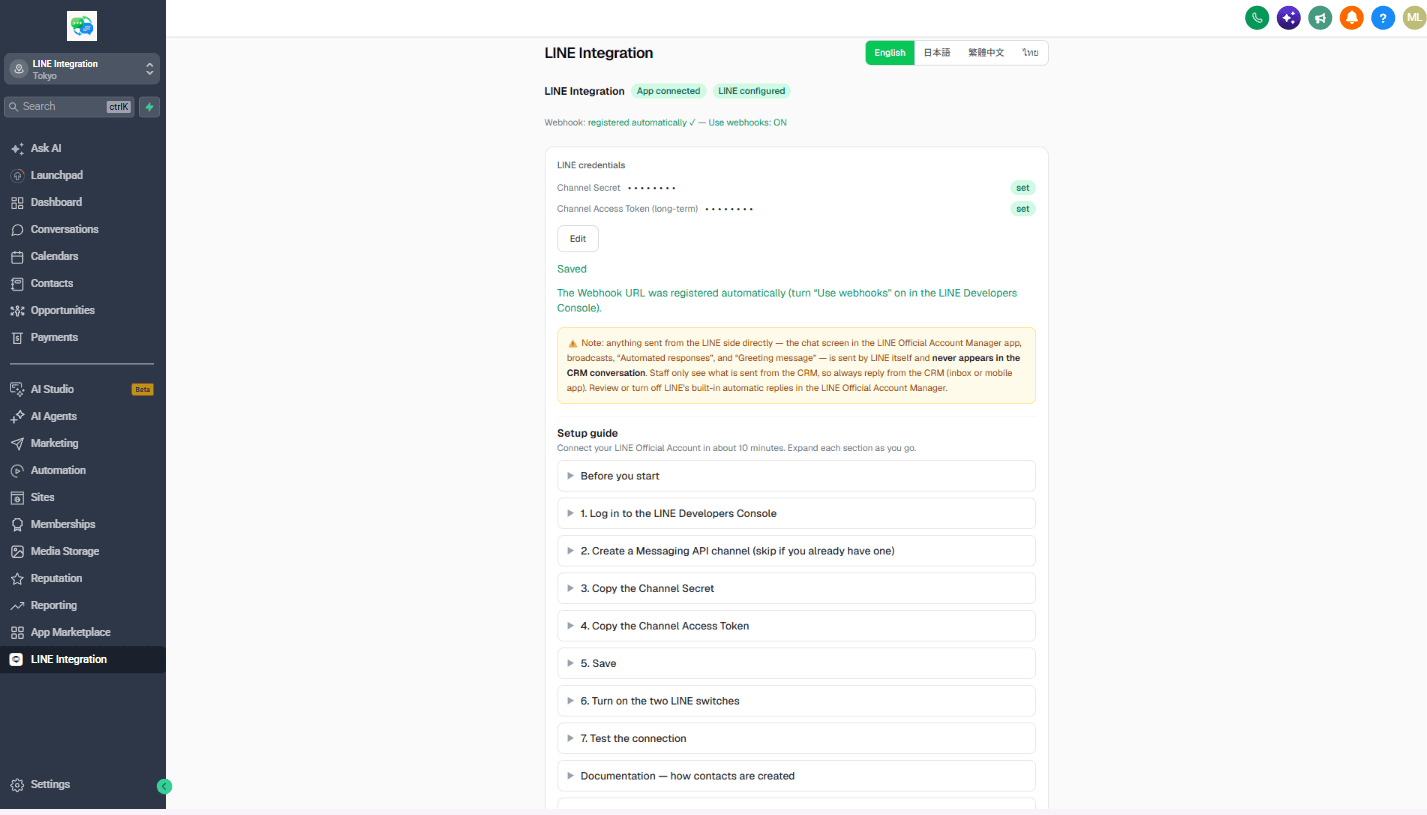
The connection screen: save the two values and the webhook URL registers itself - 3
3. Talk from GoHighLevel
When a customer messages your LINE Official Account, the conversation appears in the unified inbox labeled as LINE, a contact is created automatically, and your team replies from the conversation view. Workflow triggers (message received, friend added) are ready to use.
What you need before starting
- A GoHighLevel (or white-label) account you can install marketplace apps to
- A LINE Official Account with the Messaging API enabled
- Access to the LINE Developers console for that account (for the channel token and channel secret)
Good to know
Automated messages that are not part of a workflow are subject to LINE's platform rules: free-tier LINE Official Accounts cannot send proactive pushes, only auto-replies. Replies from the inbox and workflow sends always work. LINE's own message allowances and plan tiers apply to anything sent through LINE.