
GoHighLevel + LINE by industry: workflow recipes for real estate, clinics, and e-commerce
The same two triggers, friend added and message received, drive completely different work in different industries. Here is what teams in real estate, clinics and e-commerce actually build — within the limits of what the features can honestly do.
Ken Liu builds Jimoto Digital - LINE Integration and works on LINE-first customer communication for local businesses in Japan.
7 min read
Ask three businesses why they connected LINE to GoHighLevel and you will hear three different jobs. The real estate agency wants the midnight inquiry answered before a competitor replies. The clinic wants appointment reminders that stop depending on someone's memory. The store wants product questions answered with photos, in the app the customer is already using.
This piece walks one workflow pattern per industry, built only from features that exist today: the two LINE triggers (message received, friend added), LINE sends from any workflow, two-way images, and automatic contact creation. Where an automation has a real limit — LINE's free-plan rules, or the work that should stay human — the limit is stated where it applies.
What you'll learn
- Concrete LINE × GoHighLevel workflow patterns for real estate, clinics and e-commerce
- How the two triggers, friend added and message received, earn their keep differently per industry
- Where automation belongs and where a person should reply
- What to check before you build: LINE's free-plan rules and the monthly message allowance
The shared foundation: two triggers and one inbox
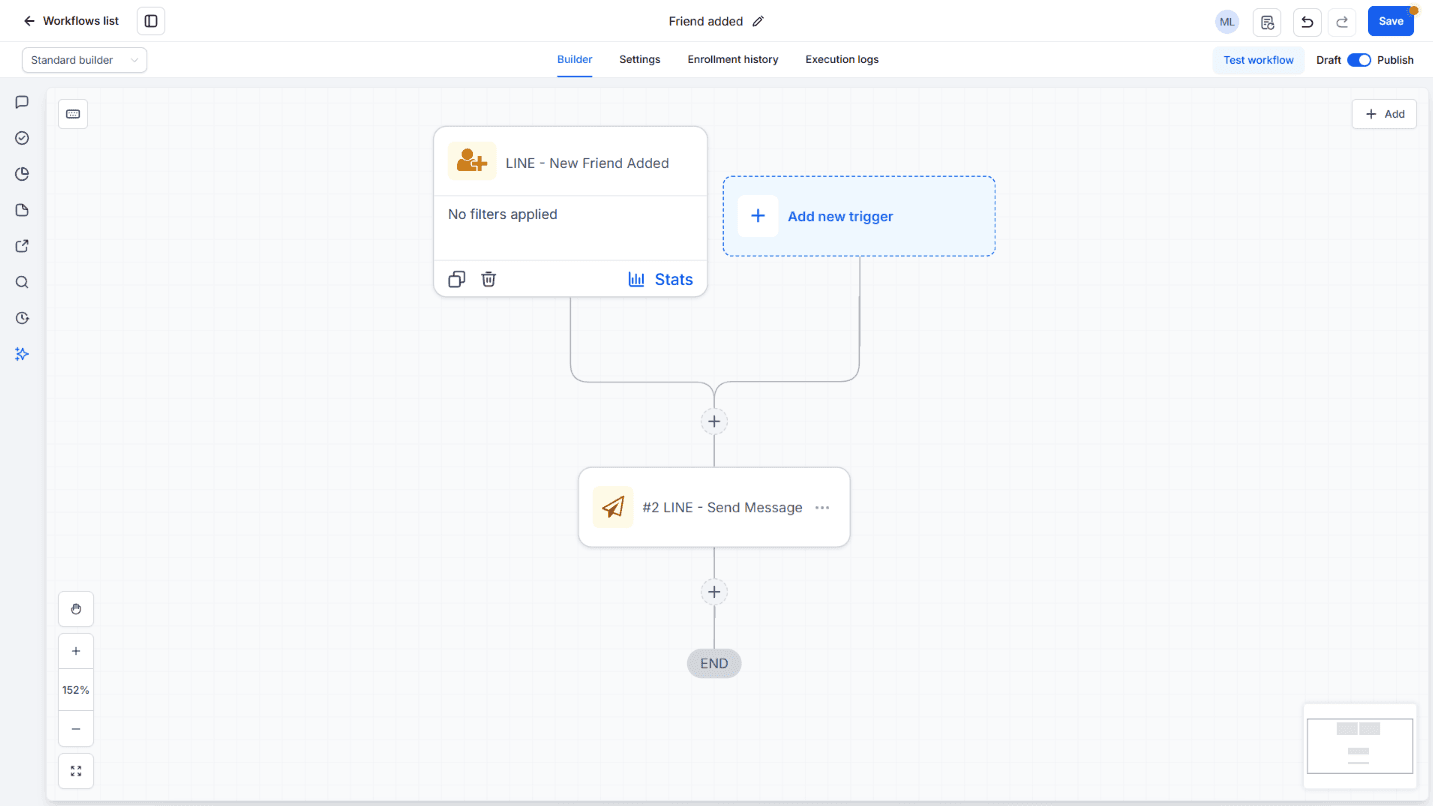
Every pattern below is a combination of the same three mechanics. A contact appears in GoHighLevel the moment someone messages or adds your Official Account, with the LINE display name and LINE ID captured automatically. Two events can fire workflows: a received message and a new friend. And whatever a workflow sends, or a teammate replies, lands on the same thread in the unified Conversations inbox.
- Trigger: friend added — react at the moment someone adds the account, before they say a word
- Trigger: message received — every inbound LINE message
- Send action: any workflow can send a LINE message — links, reminders, follow-ups
Real estate: be first on the midnight inquiry
Property inquiries are won on response time, and they arrive at midnight. The pattern that works: the message-received trigger fires an instant acknowledgment from the workflow — a short 'an agent will reply shortly' — while the inquiry itself waits in the inbox for the on-duty agent, who answers with the specifics. The contact record holds the whole exchange, so whoever picks it up in the morning starts with the full history.
The friend-added trigger carries the listing side. When someone scans the QR code on a flyer or signboard and adds the account, the welcome message with the property-search or viewing-request link goes out at the exact moment interest peaks.
- Inquiry acknowledgment fires in seconds, before any human is involved
- Floor plans and interior photos move both directions inside the thread
- Friend added → property-search or viewing-request link, sent automatically
The line that stays human: price negotiation, viewing arrangements, anything contractual. Automate the first minute; keep the deal conversation personal.
Clinics: automate the appointment routine, keep care human
Clinic front desks run on routines, and routines are what workflows do best. The common build: a friend-added trigger sends the welcome message with the web-booking link; incoming LINE messages get tagged so reception spots appointment changes at a glance; and reminders go out as workflow sends ahead of the appointment day.
One caution specific to healthcare: keep diagnosis and sensitive details out of automated flows. LINE handles scheduling logistics well; anything clinical belongs in a channel your compliance rules approve. That judgment stays with your practice, not with the automation.
- Friend added → welcome + booking link, sent once, automatically
- Appointment reminders as workflow sends before the visit day
- Reschedules handled from the shared inbox — one inbox, not personal phones
Reminder sends count against your LINE Official Account's monthly allowance; the plan tiers and per-message arithmetic are in our routes review.
E-commerce: answer with photos where the customer already is
Store customers ask with photos: a size question, a screenshot of a damaged package. The thread handles images in both directions, so support replies with the product photo without asking the customer to email anything. Post-purchase follow-ups — review requests, restock notices — run as workflow sends on a schedule you set.
Scope honesty: this channel is customer conversation, not order management. Cart and inventory live in your store system; what LINE in GoHighLevel changes is that the conversation around an order stays on the contact instead of scattering across personal accounts.
- Product questions answered with photos, both directions
- Review requests and restock notices as scheduled workflow sends
- Every buyer's thread stays on the contact, so repeat customers are recognized
Bulk and broadcast sends consume the LINE plan allowance fastest; the per-message arithmetic is in the routes review.
Where to draw the automation line
Across all three industries the split lands in the same place. Automate the predictable first touch and the time-based routine; keep judgment, negotiation and complaints with a person.
- Automate: inquiry acknowledgment, friend-added welcome + link, appointment reminders, scheduled follow-ups
- Keep human: pricing and negotiation, anything clinical or contractual, complaints
- Know the platform rules: automated messages that are not part of a workflow follow LINE's own limits — free-tier Official Accounts are limited to auto-replies. Inbox replies and workflow sends work normally, and LINE's monthly allowance applies to what you send
From zero to the first workflow
Every pattern above starts the same way. Install the app from the marketplace, paste the two LINE Developers console values, and the webhook registers itself — about ten minutes end to end. Then build one workflow: the friend-added welcome with your booking or search link is the smallest useful start.
Pick your industry's pattern, build the smallest version of it, and let the inbox show you what the next automation should be.
Frequently asked questions
- Can I send booking links through LINE?
- Yes. A workflow's send action can include any URL, which is why the booking-link pattern is the standard first build for clinics and salons. The customer taps the link in LINE; the booking itself happens on your booking system's page.
- Does this work on LINE's free plan?
- Receiving messages and replying from the inbox work on any plan. LINE's own rules restrict automated messages that are not part of a workflow on free-tier accounts (auto-replies only), and messages you send count against the plan's monthly allowance — 200 on the free plan. The tier arithmetic is in our routes review.
- We run multiple stores or client accounts — does this fit?
- Pricing is per account: one LINE Official Account per GoHighLevel account. Agencies can bulk-install across client accounts in one operation, and on white-label platforms end users never see vendor branding.
- Does it connect to our cart or booking system?
- The app's scope is the LINE ↔ GoHighLevel connection itself. Your cart, inventory and booking tools keep working as they do in GoHighLevel today — through GoHighLevel's own features and integrations.